How to Set Up A FERPA PIN
FERPA is the Family Educational Rights and Privacy Act and is a federal law that protects the privacy of your education records. You will need to provide your FERPA PIN when seeking service or information from your student account by a staff member. You may also still be required to present a government-issued ID for certain services. Students may add a person or organization as a relationship and share the PIN number. This would allow the person or organization to receive information about the student’s account. Please note, this is for information sharing only and does not authorize others to make actions on the student’s behalf.
You may have created a four-digit FERPA PIN when you filled out your admissions application. This PIN does not expire but if you ever need to view or change your PIN, you can use the following instructions as staff are unable to assign or change your PIN.
Setting Up A FERPA PIN Step by Step Guide
FERPA is the Family Educational Rights and Privacy Act and is a federal law that protects the privacy of your education records. You will need to provide your FERPA PIN when seeking service or information from your student account by a staff member. You may also still be required to present a government-issued ID for certain services.
You may have created a four-digit FERPA PIN when you filled out your admissions application. This PIN does not expire but if you ever need to view or change your PIN, you can use the following instructions as staff are unable to assign or change your PIN.
| 1. Log in to your Student Center at https://my.maricopa.edu with your MEID and password. |
|
2. Click on the “profile” tile
|
3. On the menu on the left side, click “FERPA Pin Number”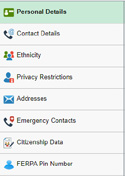 |
4. If you have already created a PIN, it will show on the main screen. You can change it there as many times and as often as you like. |
| 5. Click the blue “save” button at the bottom to save your PIN. |
|
|
| You can also view, add, and remove authorized persons here. These are any people (such as parents, guardians, spouses, employers, or others) who you want to have access to your educational records. Records include, but are not limited to, financial aid, scholarships, tuition, registration, and academic advising information. Without prior consent, we are not able to provide any information about your records to anyone. To add an authorized person, follow these instructions: |
6. To add your first authorized person, click the “Edit/View Release Info” |
| 7. Fill out all of the information for the person you want to release your information to. You can also choose what specific information may be released and for which of the Maricopa colleges. |
| 8. Check all of the boxes at the bottom of the form to agree to the terms of use. |
9. Click the blue submit button at the top of the screen to save this user. |
10. Repeat steps 6-9 to add additional users using the “+” sign on the right. |
| If/when your authorized person wishes to speak to any staff on your behalf, they will need to provide 1) your name, 2) your FERPA PIN, and 3) their relationship to you. Students may revoke authorization at any time by removing the listed individual and changing your PIN. |
